Before installing Tensorflow, first install python in your machine.
Use this link to download and install latest Python 3.6.2. This will automatically install Python, PIP and set environment variables. Don't mess with the default settings here.
https://www.python.org/ftp/python/3.6.2/python-3.6.2-amd64.exe
First install Microsoft Visual C++ Redistributable 2015 x64
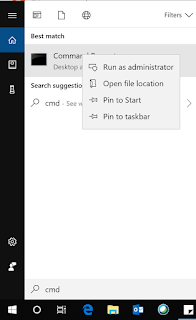
Type CMD in windows search bar and right-click run as administrator.
Then you need to run the below command
Now, tensor flow is installed in your computer. To verify the installation of tensorflow, in the same terminal run python and then below:
If there is no error and you see below output, then tensor flow installation is successful.
Use this link to download and install latest Python 3.6.2. This will automatically install Python, PIP and set environment variables. Don't mess with the default settings here.
https://www.python.org/ftp/python/3.6.2/python-3.6.2-amd64.exe
First install Microsoft Visual C++ Redistributable 2015 x64
Type CMD in windows search bar and right-click run as administrator.

Then you need to run the below command
C:\> pip3 install --upgrade tensorflow
Now, tensor flow is installed in your computer. To verify the installation of tensorflow, in the same terminal run python and then below:
>>> import tensorflow as tf
>>> hello = tf.constant('Hello, TensorFlow!')
>>> sess = tf.Session()
>>> print(sess.run(hello))
If there is no error and you see below output, then tensor flow installation is successful.
Hello, TensorFlow!
If you see error like AVX support not there, follow
Uninstall existing tensorflow using "pip
uninstall tensorflow", then reinstall it using "pip install <Path to
downloaded WHL file>". Download this WHL file into your computer - github.com/fo40225/tensorflow-windows-wheel/blob/master/1.10.0/…
, if you have a 3.6 Python and a 64-bit windows(ignore the amd you
see). Otherwise navigate a step back in github and search for correct
WHL. It works


